Algebra Tiles
mathsbot.com/manipulatives/tiles
The MathsBot Algebra Tiles is a virtual manipulative that brings one of the most powerful concrete representations in secondary mathematics into the digital classroom. Algebra tiles are very similar to Dienes or base 10 blocks, with the key difference that the length of the longer side is unknown, it represents \(x\). The reverse of each tile is red, denoting the negative or opposite of the positive side.
This is an ideal tool to use when physical algebra tiles are not available or convienient. It is ideal for pupils to use on 1-2-1 devices.
The tool includes the ability to remove zero pairs, duplicate blocks easily, use a corner frame (axis), and split tiles for fractional and decimal quantities. It also comes with a built-in set of problems for students to attempt.
User guide: MathsBot provides a full interactive instruction manual for this tool at mathsbot.com/manual?id=7. Well worth looking at before using it in the classroom for the first time.
Understanding the tiles
There are three tile types, each representing a distinct quantity:
| Tile | Shape | Represents | Reverse (red) |
|---|---|---|---|
| Unit tile | Small square (\(1×1\)) | \(1\) | \(−1\) |
| \(x\)-tile | Rectangle (\(1×x\)) | \(x\) | \(−x\) |
| \(x²\) tile | Large square (\(x×x\)) | \(x²\) | \(−x²\) |
The key insight pupils need before anything else: the length \(x\) is unknown, but it is longer than \(1\). That single fact unlocks everything the tiles can do.
Why use algebra tiles?
The EEF guidance report states that "in general the use of multiple representations appears to have a positive impact on attainment" and mentions how this arises from strengthening students' conceptual understanding. Algebra tiles provide exactly this, a concrete handle on abstract ideas that pupils often encounter only as rules to memorise.
Using an algebra tile model for most algebraic problem solving would be very inefficient or often impossible, particularly when the numbers become large. However, algebra tiles are fantastic for providing a concrete handle on some very abstract concepts. They are best thought of as a teaching tool, something to build understanding before pupils transition to working abstractly.
Topic 1: Directed numbers and the zero pair
This is an ideal first use of the tiles, even before any algebra is introduced. The red/positive colour distinction makes the concept of negative numbers visceral and visual.
Place three positive unit tiles and three negative (red) unit tiles on screen. Ask: "What is the total value?" Guide pupils to see that each positive-negative pair cancels. This is the zero pair principle. Use the tool's remove zero pairs feature to watch them disappear, leaving zero.
Why it matters: Pupils who struggle with \(−3 + 5\) or \(2 − (−4)\) often lack a mental model for why the rules work. The tiles give them one. Algebra tiles enable students to add and subtract integers before any variables are introduced, making the transition to algebra smoother.
Topic 2: Forming and simplifying expressions
Introduce the x-tile alongside unit tiles. Ask pupils to build expressions like \(2x + 3\) or \(3x − 1\) (using red unit tiles for the \(−1\)). Then combine two expressions on screen and ask: "Can any tiles be paired and removed?" Pupils learn to understand collecting like terms not as a rule but as a natural consequence of grouping identical tiles.
One interesting benefit is that when this is run with Year 7s, there's a mixture of unsimplified notation such as \(2 × g\) and \(g × 2\), but it's rare to come across a pupil who writes \(g²\), as they are often wont to do when just presented with letters in the abstract. The tiles physically prevent that misconception from forming.
Discussion question: "Can you build two expressions that look different but have the same total value? How do you know they're equal?"
Topic 3: Solving linear equations
Set up an equation such as \(2x + 3 = 7\) using tiles on both sides of a central dividing line (the tool's axis/frame feature). Pupils then work to isolate the x-tile by removing equal quantities from both sides. Again, not as an abstract rule but as a visible balancing act.
Algebra tiles provide meaning to variables and allow students to solve first and second-degree equations using an area model. Pupils who have been told "do the same to both sides" but never understood why will often have their first genuine understanding moment here.
Topic 4: Expanding brackets
Use the corner frame (axis) to set up an area model. Place one dimension along the top and another down the side, for example, \(x + 2\) along the top and \(x + 3\) down the side. The tiles fill the interior of the rectangle, showing \(x²\), three x-tiles, two x-tiles, and six unit tiles. Pupils read off the expansion: \(x² + 5x + 6\).
This is one of the tiles' most powerful uses. The area model makes expansion feel geometrically obvious rather than procedural, and it scales naturally to double brackets of any complexity.
Topic 5: Factorising
Factorising is expanding in reverse. Start with a collection of tiles (say, \(x² + 5x + 6\)) and ask pupils to arrange them into a rectangle. The dimensions of that rectangle are the factors. Algebra tiles enable students to factor trinomials by turning an abstract symbolic manipulation into a spatial puzzle.
Pupils quickly discover that not every arrangement of tiles forms a rectangle, and that this is what it means for an expression not to factorise nicely.
Topic 6: Completing the square
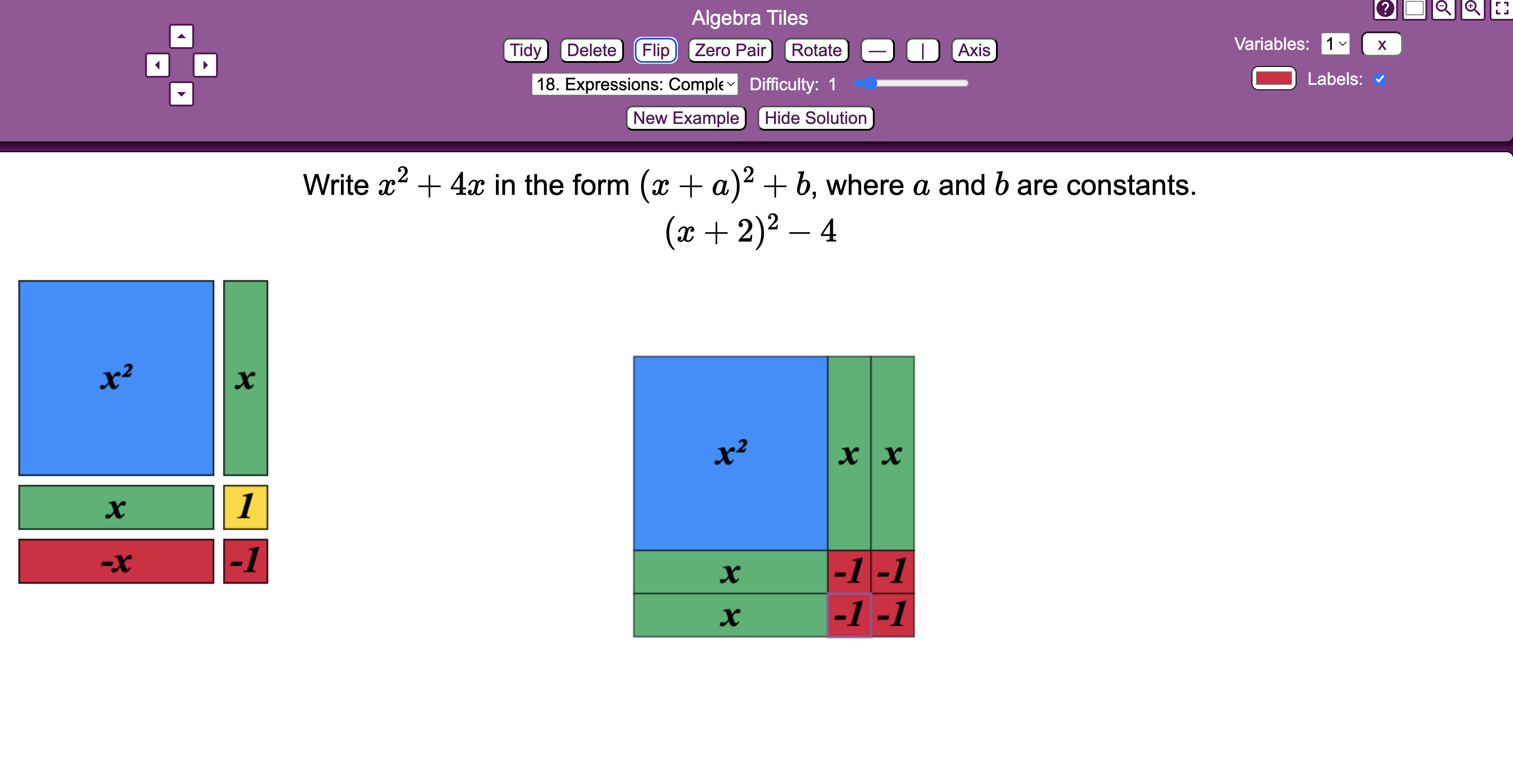
One teacher first came across algebra tiles while trying to teach a group of reluctant Year 10s how to complete the square, and was immediately sold. Algebra tiles can be used to illustrate completing the square for quadratic expressions, and hence, where the method gets its name.
Start with \(x² + 6x\). Arrange the \(x²\) tile and six x-tiles into an L-shape, attempting to form a square. Pupils can see the "missing corner", four unit tiles, and understand viscerally why the method adds and subtracts that value. The name completing the square ceases to be a metaphor and becomes a literal description.
Practical tips for classroom use
Introduce the tiles before the algebra. Spend a few minutes letting pupils explore what the tiles represent before diving into a topic. Give students plenty of time to use the tiles. There will be students that 'get' the concepts very quickly and will feel that the tiles are not necessary. Encourage them to use the tiles a few times at least.
Don't abandon the abstract. Be sure students record their methods alongside their use of tiles so that they will eventually be able to work independently of them. Question students as to why they are using the tiles in such a way, in order to get them to see the structure behind the problem.
Avoid the "just for struggling pupils" perception. Secondary maths departments can be guilty of seeing manipulatives as 'too primary school' and reserving them only for nurture group classes. Even top set KS4 classes could benefit from using tools to consolidate their understanding.
Use the built-in problems. The tool includes a bank of pre-set problems pupils can work through. These are useful for independent or paired practice once the initial teaching is done.
Summary: topics at a glance
| Topic | Tile feature used |
|---|---|
| Directed numbers | Unit tiles, zero pair removal |
| Collecting like terms | \(x\)-tiles and unit tiles, grouping |
| Solving linear equations | Axis/balance, isolating \(x\) |
| Expanding brackets | Corner frame, area model |
| Factorising | Rearranging into a rectangle |
| Completing the square | Building toward a square, identifying the gap |