Reflection Lab
sensemake.uk/reflection-lab
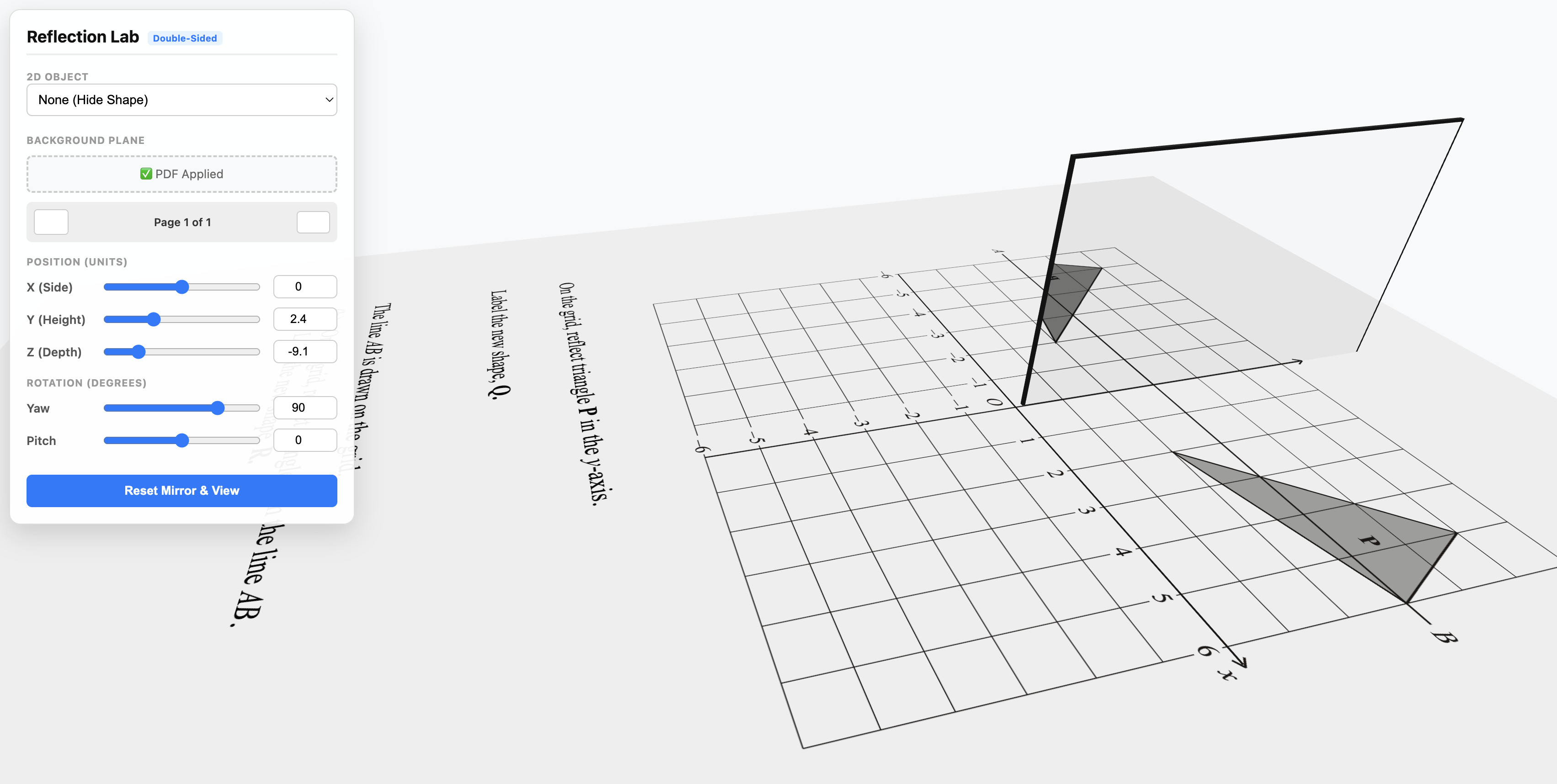
The Reflection Lab is an interactive 3D classroom tool for exploring reflection as a geometric transformation. A double-sided mirror stands on a ground plane alongside a 2D shape (or an uploaded PDF), and pupils see the reflected image appear on the mirror surface in real time as the mirror is moved, rotated, or tilted. The tool is well suited to lessons on line symmetry, reflecting shapes in the coordinate plane, and modelling GCSE transformation questions directly on the page.
How the tool works
The scene has three elements: a mirror that can be moved and rotated, a 2D object standing on the ground, and a background plane (the floor itself, or a PDF uploaded as the floor texture). The camera orbits freely, so the scene can be viewed from any angle, including edge-on along the mirror, to see the line of reflection as pupils would see it on paper.
- Mirror controls: position sliders (X, Y, Z) and rotation sliders (Yaw, Pitch) set the mirror precisely. For rapid repositioning, hold Ctrl and drag anywhere in the 3D view to slide the mirror across the floor; the X and Z sliders update to match.
- 2D objects: choose from an equilateral triangle, a square, the letter F, a directional arrow, or None. The letter F and the arrow are non-symmetrical, which matters: reflection flips orientation, and an asymmetric object makes that visible. When None is selected, only the floor and mirror are shown, which is useful when working entirely from an uploaded diagram.
- PDF backgrounds: upload any PDF to texture the ground plane. Multi-page PDFs get page-turning buttons beneath the upload control. This is how a worksheet, textbook page, or GCSE question is brought "into" the scene so the mirror can be used to reason over it.
- Annotation: a pen tool draws directly on the ground plane (or the PDF). Strokes live on that surface, so when the camera orbits or zooms, the ink stays stuck to the floor rather than floating in front of the view.
Getting started
- Orbit the view by left-dragging in the scene. Scroll or pinch to zoom.
- Choose a 2D object from the dropdown, or leave it on None if working from a PDF.
- Move the mirror with the X, Y, Z and Yaw, Pitch sliders, or by holding Ctrl and dragging in the 3D view.
- Upload a PDF as the floor if you want to work over a specific diagram or question.
- Use Reset mirror & view in the side panel to restore the default camera and mirror pose at any time.
The toolbar also provides Reset (which additionally clears all annotation ink), Undo / Redo (stepping back through mirror moves, view changes, PDF page changes, and pen strokes), dark mode, and fullscreen.
2D objects
| Object | Symmetrical? | Best used for |
|---|---|---|
| Equilateral triangle | Yes (3 lines of symmetry) | Clean starting shape; invites the question "can you tell it's been reflected?" |
| Square | Yes (4 lines of symmetry) | As above, with a stronger pull towards the "it looks the same" misconception |
| Letter F | No | Demonstrates unambiguously that reflection reverses orientation |
| Directional arrow | No | Same purpose as the F, with direction made explicit |
| None | — | Floor-only view for working from a PDF or annotations alone |
The letter F is the single most pedagogically useful option here. Because it has no symmetry of its own, any reflection is immediately identifiable as a reflection, and not as a translation or rotation. Teachers working on the distinction between transformations should reach for F first.
Using PDFs on the floor
The ability to lay a PDF on the ground plane is the feature that sets this tool apart from a standard reflection widget. Teachers can:
- Drop in a past paper question that uses reflection in the plane, position the mirror along the line of reflection specified by the question, and show the image directly on the mirror surface.
- Use a coordinate grid sheet as the floor, then work through reflections in \(y = x\), \(x = 2\), or any other line by positioning the mirror accordingly. The yaw control rotates the mirror to match diagonal lines; \(y = x\) on a standard orientation corresponds to a yaw of \(45°\).
- Load a diagram from a textbook or worksheet (exported as PDF) to stay true to the exact wording and figure that pupils will meet in homework or exams.
Because the mirror is a three-dimensional object, pupils can see the reflected image occupying real space, and then orbit the camera to look straight down at the scene. The top-down view collapses everything back to 2D, which is the view pupils will work with on paper. Switching between the perspective view and the overhead view is, in itself, a powerful move: it links the physical intuition of a mirror to the abstract "reflect this shape in the line" instruction printed on the question.
Annotation tools
The pen is activated from the toolbar or by pressing P (when not typing in a field). Options include:
- Freehand, line, and arrow for quick annotation.
- Shapes (rectangle, triangle, hexagon, L-shape, ellipse, plus), each available as outline or filled, from the grid icon in the floating palette.
- Eraser to tap a stroke and remove it; Select to tap strokes (Ctrl or Cmd + click to add to the selection) and then delete them.
- Clear all to wipe the surface, and an eye icon to temporarily hide or show ink without deleting it.
All ink is drawn on the ground plane, not on the screen. When the camera orbits, annotations rotate with the floor and stay locked to the question or grid beneath them. This makes it possible to circle a point on a PDF, then orbit the view to confirm that the reflection lands exactly where you marked.
Classroom uses
What stays the same, what flips? Choose the letter F and place the mirror vertically behind it. Ask pupils to predict the reflection before it is revealed. Then rotate the mirror with the yaw slider while the F stays put. The orientation of the image flips with the mirror, but the F's own structure is unchanged. This separates two ideas pupils often conflate: the object has properties of its own (what it looks like), and the reflection has properties relative to the mirror (how it is flipped).
Modelling GCSE reflection questions. Scan or export a reflection question with wording such as "Reflect triangle P in the y-axis and label the new shape Q". Load it as the PDF floor and set the 2D object to None. Position the mirror along the line of reflection named in the question. Pupils can now see the reflected image appearing on the mirror and compare it to where they would draw Q on paper. Orbit to a top-down view and the scene becomes indistinguishable from the printed question, with the image visibly in place. Does the answer change if the mirror slides along its own line? What if the mirror is tilted? Why not? These questions probe the idea that a reflection is determined by the line, not by the mirror object itself.
Lines of symmetry. Select the equilateral triangle and position the mirror so its line of reflection passes through the triangle. Drag the mirror around (Ctrl + drag is quickest here) and ask pupils to call "stop" whenever the reflected image sits exactly on top of the original. Each "stop" corresponds to a line of symmetry. This works as a whole-class starter for KS3 work on symmetry, and extends naturally: how many lines of symmetry does a square have? A regular hexagon? An arbitrary rectangle?
Invariant points and lines. Place the letter F so that part of it touches the mirror. Ask pupils to identify which points of the original land on themselves in the reflection. Moving the mirror so it passes through the shape turns those invariant points into an invariant line. This is a topic pupils often meet only in the abstract; seeing the invariant line directly on the mirror surface makes it concrete.
Discussion questions to use with the tool:
- Which features of the shape are preserved under reflection? Which change?
- If the mirror moves parallel to itself, how does the image move?
- What happens to the image if the mirror is rotated by \(90°\) about its own base while the object stays still?
- Where would the mirror need to be for the image to land exactly on top of the original?
- Looking from directly above, what do you see that you don't see from the side? What do you lose?
Pedagogical note
Reflection is one of the first transformations pupils meet, and it is easy for them to treat it as a procedure: count the squares to the line, count the same number back, draw the point. That procedure works, but it often masks the geometric idea underneath. The Reflection Lab puts a physical mirror in front of pupils, lets them interact with the very diagrams they will meet on paper, and invites the "what stays the same, what changes?" line of questioning that sits at the heart of Variation Theory. The tool complements rather than replaces paper-and-pencil work: the mirror builds the mental picture, and the procedure records the picture.
The Reflection Lab was created by Callum Adamson and is shared on sensemake.uk with permission.