Fraction Explorer
rupertlinacre.com/fraction_vis
The Fraction Explorer is an interactive visualiser that displays a single fraction across nine simultaneous representations. A fraction number line, a decimal number line, a pie, money, a 100-square, two equivalent-fraction views, apples, and a percentage bar. Type a numerator and a denominator and every panel updates as you type. A one-click button hides every answer at once and replaces them with contextual questions, turning the page into a prediction routine. The aim is not to teach any single representation but to make the equivalences between them feel obvious.
How the tool works
Set the fraction at the top of the page. The tool handles improper fractions, with several panels extending or repeating to fit.
Two further buttons sit at the right of the preset row:
- Hide all / Reveal all. With everything visible, pressing Hide all masks the answer in every panel: the panel headings stay in place, the underlying denominator structure remains visible, but the shading is hidden and replaced with a question generated for the current input. For \(\tfrac{3}{4}\) the questions read "Where is three quarters on the number line?", "What decimal is equivalent to three quarters?", "If 1 whole is 4 apples, how many apples show three quarters?", and so on. The button label flips to Reveal all, which restores everything in one click.
- Settings - choose which panels are visible and in what order.
Each panel also carries its own Hide / Show toggle in the top-right corner. This works at the same level as Hide all but for a single panel: it masks that panel's answer while leaving the prompt visible. The intended flow is: hide everything, ask pupils to predict an answer for each panel, reveal one at a time as the conversation calls for it.
Getting started
- Type a fraction. Try \(\frac{3}{4}\). Every visible panel updates as you type.
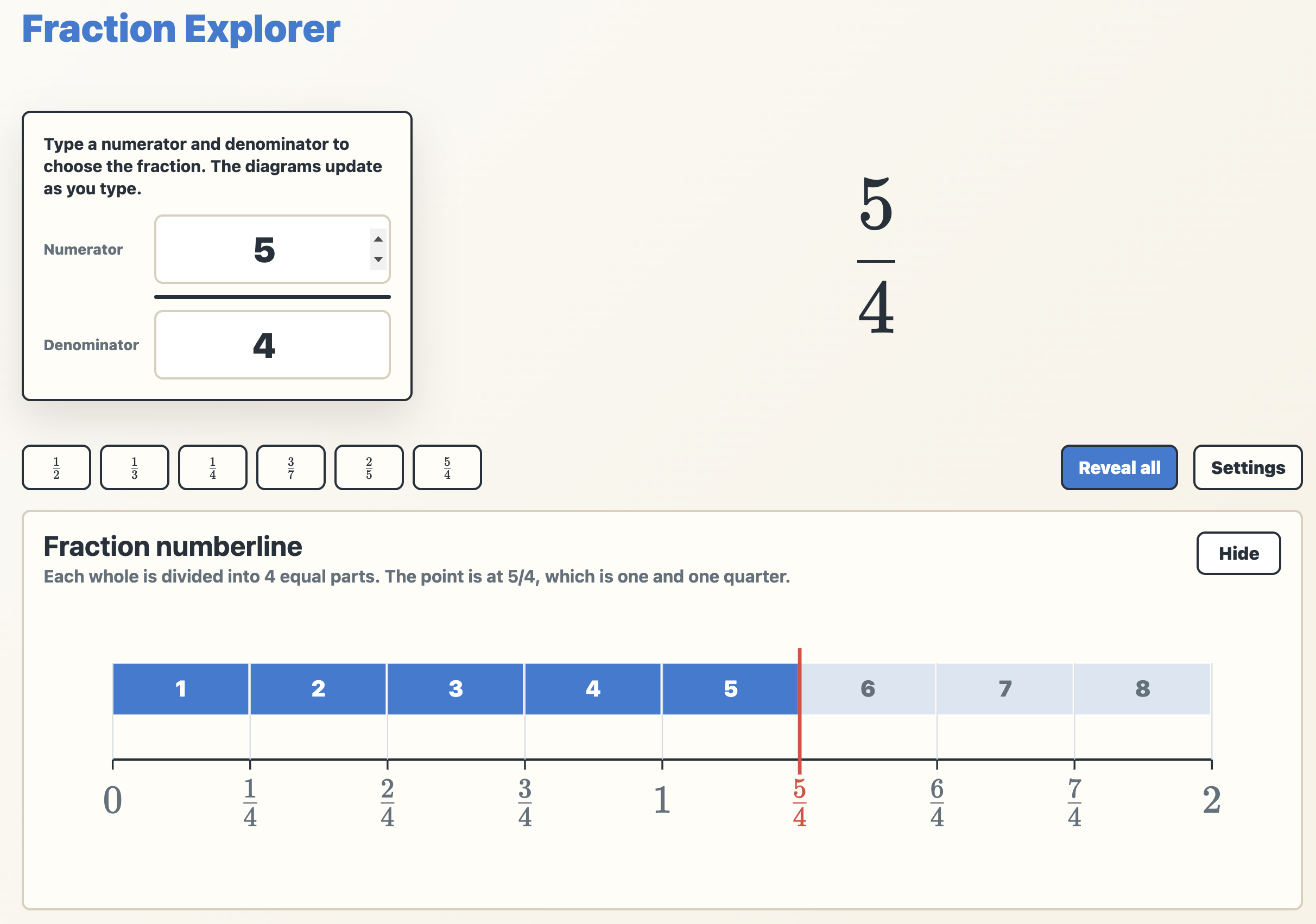
- Click a preset. The chips below the input fields are quick examples; \(\tfrac{5}{4}\) shows what happens with an improper fraction.
- Tune the page in Settings. Untick any panels you don't want this lesson, and use the up/down arrows to put the most relevant ones at the top.
- Press Hide all to enter prediction mode. Each panel now shows a question instead of an answer.
- Reveal panels one at a time as pupils discuss each in turn. Reveal all restores everything at the end.
Numberline representations
Fraction numberline. A horizontal bar above a 0-to-1 number line. The bar is divided into denominator-many equal parts and the shaded segments are numbered. For improper fractions the panel extends to fit: \(\tfrac{9}{4}\) shows a bar from 0 to 3 split into twelve quarter-segments with nine shaded, and the number line below labelled \(0, \tfrac{1}{4}, \tfrac{2}{4}, \tfrac{3}{4}, 1, \tfrac{5}{4}, \dots, \tfrac{9}{4}, \dots, 3\) with the current value picked out in red. This is the panel that most directly answers where does this fraction live?
Decimal numberline. The same idea translated to tenths. The bar is split into denominator-parts as above, but the number line beneath runs in decimal notation: \(0, 0.1, 0.2, \dots, 1\). A small badge marks the current decimal value above the bar. For improper fractions the line extends to the next whole above the value (so \(\tfrac{9}{4}\) extends to 3 and is labelled in tenths). Place this alongside the fraction numberline and the conversion \(\tfrac{3}{4} = 0.75\) becomes a matter of looking, not calculating.
Part-whole representations
Pie. A circle divided into denominator-many equal sectors with numerator-many shaded. Each sector is numbered, which makes counting explicit for younger pupils. For improper fractions the panel draws as many pies as needed, with sector numbering running across the full collection: for \(\tfrac{9}{4}\), the first pie is fully shaded with sectors 1, 2, 3, 4, the second is fully shaded with 5, 6, 7, 8, and the third has a single shaded sector labelled 9 with sectors 10, 11, 12 unshaded. This is one of the cleanest visual arguments available for "\(\tfrac{9}{4}\) is two whole pies and one quarter more."
Apples. A row of apples, where shaded apples are red and unshaded apples are greyed out. A "1 WHOLE" label sits above the row. Improper fractions extend downward into additional rows: for \(\tfrac{9}{4}\), three rows appear, each headed 1 WHOLE, with four red apples in each of the first two rows and a single red apple in the third. The mixed-number reading \(\tfrac{9}{4} = 2\tfrac{1}{4}\) is built into the layout, and the descriptive caption makes it explicit: "9 apples are selected. Since 4 apples make 1 whole group, this is two and one quarter."
Real-world context
Money. The fraction is interpreted as a fraction of £1 and shown as a stack of UK coins making the correct total. The default view (Group off) uses the fewest coins: for \(\tfrac{9}{4}\) of £1 = £2.25, that's £1 + £1 + 20p + 5p.
The Group checkbox switches to a structurally different view: the total is divided into denominator-many equal portions of \(\tfrac{£1}{d}\), each shown as a separate card. For \(\tfrac{9}{4}\), this displays nine cards of 25p (each a 20p plus a 5p). A direct visual argument for "nine quarters means nine groups of one quarter." The unit-fraction structure that pupils need for the formal definition of a fraction is made entirely concrete: the coin-card is the unit fraction, and the count of cards is the numerator.
Bridging fractions, decimals, and percentages
100 square. A 10×10 grid with the fraction interpreted as parts-per-hundred and the corresponding number of cells shaded. The shading appears banded into groups of \(100/d\), making the structure of the equivalence visible: \(\tfrac{3}{4}\) shades three groups of 25, with the four bands of 25 alternating in colour. This panel is most useful for proper fractions whose denominator divides 100 cleanly; with awkward denominators the parts-per-hundred reading still works but the bands lose their tidiness.
Percentage. A horizontal percent bar with the current value marked. For proper fractions the bar runs from \(0\%\) to \(100\%\), with a footer reminding pupils that "75% means 75 parts per hundred". The etymology that pupils benefit from hearing repeatedly. For improper fractions the bar rescales to accommodate values above 100%: \(\tfrac{9}{4}\) shows on a bar running 0–300% with the current 225% marked, and the panel notes "so it is more than one whole."
Place these two panels alongside each other and the chain \(\tfrac{3}{4} \rightarrow \tfrac{75}{100} \rightarrow 75\%\) becomes a single visual story rather than three separate facts.
Equivalence
Equivalent fractions grid. A rectangular array showing the fraction as a multiplication of itself by a chosen factor. A slider labelled "Rows of d" (where d is the denominator) sets how many rows to draw; each row contains d cells with numerator-many shaded. With \(\tfrac{3}{4}\) and the slider at 4, the grid is 4 rows of 4 cells = 16 in total, with 12 shaded, generating \(\tfrac{3}{4} = \tfrac{12}{16}\).
Equivalent fractions. Two pie views side by side with an equals sign between. The left shows the original fraction, the right shows it after each part is split by the slider value. The shaded sectors keep the same colours as the original, so pupils can see that the same area is being described with more parts. With \(\tfrac{1}{2}\) and the slider at 4, the half-circle on the left becomes four equal blue eighths within the same semicircle on the right: a single colour spread across four sectors. With \(\tfrac{3}{4}\) and the slider at 2, four colours (one per quarter of the original) each split into two same-coloured eighths. The colour mapping is per-part of the original denominator, so the connection between which sector and which equivalent piece stays visible. For improper fractions the panel renders multiple pie pairs, mirroring the Pie panel.
Classroom uses
Predict-then-reveal as a routine. This is the use case the tool is most clearly designed for. Press Hide all. Read the prompt for one panel. Pupils write a prediction on a mini-whiteboard. Press Show on that panel. Repeat. Because each prompt is generated automatically for the current fraction, the routine works for any input the teacher types in, with no preparation. Used as a starter, this hits fluency, conversion, definition, and real-world meaning in three minutes.
Triangulating a fraction. With the page in Hide all state and Settings configured to a chosen subset, reveal panels one at a time and ask "what does this tell us about \(\tfrac{3}{4}\) that the previous panel didn't?" Each new panel is a different embodiment of the same number; the question makes the differences between embodiments themselves the focus.
The fraction-decimal-percentage bridge. Use Settings to reduce the page to just the fraction numberline, decimal numberline, and percentage panels. Type a sequence of fractions: \(\tfrac{1}{4}\), \(\tfrac{1}{2}\), \(\tfrac{3}{4}\), \(\tfrac{2}{5}\). The conversions appear together each time, and a question like "what is \(\tfrac{3}{8}\) as a percentage?" becomes answerable by looking at the bar before reaching for a calculation.
Why does cross-multiplying work? Settings → keep only Equivalent fractions. Set the fraction to \(\tfrac{2}{3}\) and slide Split each part into from 1 to 6. Pupils watch the pie subdivide further while the shaded area stays put, generating \(\tfrac{4}{6}\), \(\tfrac{6}{9}\), \(\tfrac{8}{12}\), … The "rule" \(\tfrac{a}{b} = \tfrac{ka}{kb}\) becomes a description of what they have just seen, not a procedure to memorise.
Improper fractions and "more than one." Type \(\tfrac{5}{4}\), then \(\tfrac{7}{4}\), then \(\tfrac{9}{4}\), with Pie, Apples, Money (Group on), and Percentage visible. The pies, apples, coin-cards, and 100%-plus bar all extend together, anchoring the abstract idea of an improper fraction in four parallel concrete embodiments. The question "how many wholes is in this fraction?" can be answered by looking at any of them.
Money's Group mode and the unit-fraction definition. Set Money + Group on, hide everything else, and step through \(\tfrac{1}{4}, \tfrac{2}{4}, \tfrac{3}{4}, \tfrac{4}{4}, \tfrac{5}{4}\). Each step adds one more 25p card. The formal definition "a fraction \(\tfrac{a}{b}\) means \(a\) copies of \(\tfrac{1}{b}\)" now has a piece of 25p change behind it. The unit fraction visible as a unit, the numerator visible as a count of those units.
Spot the misconception. Set the page to Hide all, then type \(\tfrac{2}{5}\). Ask pupils to predict the decimal before revealing the Decimal numberline. The common error of \(\tfrac{2}{5} = 0.25\) falls apart instantly when the panel reveals \(0.4\).
Pedagogical roots
The Fraction Explorer rests on a principle sometimes called the rule of four (or more broadly, multiple representations): a number is understood more deeply when it can be recognised in symbolic, numerical, graphical, and verbal forms, and when the connections between those forms are made explicit. The same idea underlies Jerome Bruner's enactive–iconic–symbolic progression and the Concrete–Pictorial–Abstract (CPA) framework that informs many maths curricula.
What this tool adds is simultaneity. A change to the input propagates everywhere at once, so equivalences become observable phenomena rather than facts to be remembered, and concealability. The Hide / Reveal architecture inverts the default: instead of "here is what \(\tfrac{3}{4}\) looks like in eight ways," the tool says "here are eight questions about \(\tfrac{3}{4}\). What do you predict?" Predictions made before a result is revealed are a well-evidenced lever on conceptual learning, and Fraction Explorer makes a prediction routine the path of least resistance rather than something the teacher has to engineer.