Two Colour Counters
sensemake.uk/two-colour-counters
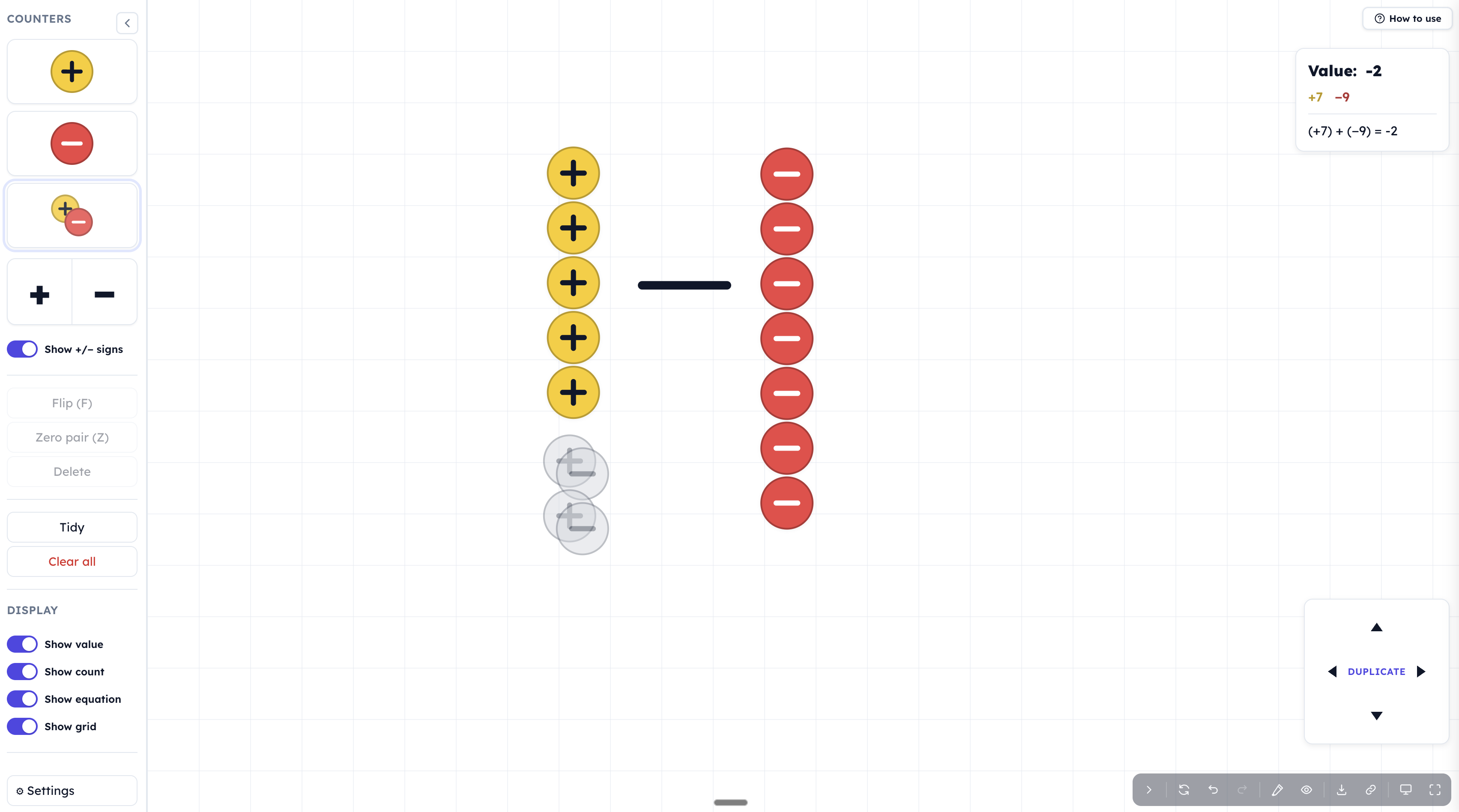
The Two Colour Counters tool is an interactive manipulative for modelling directed number, zero pairs, and signed arithmetic. Drag positive (+) and negative (−) counters onto a canvas, combine them into zero pairs, and watch the live value, count, and equation update in real time. Operation signs can be added to the canvas to turn a collection of counters into a full calculation such as \((+7) + (-9) = -2\).
The tool is designed for both whole-class demonstration and independent exploration. Every action, from dropping a single counter to tidying the canvas, is undoable; any configuration can be shared via a locked link so pupils see exactly what the teacher set up.
There are several good alternative two colour counters tools around including those on mathsbot.com and mrbartonmaths.com
How the tool works
- Counter piles - drag the yellow (+), red (−), or combined zero-pair icon onto the canvas to add counters. Pressing Enter on a focused pile does the same via keyboard.
- Operation signs - an optional second card in the sidebar provides draggable large \(+\) and \(-\) symbols, used to lay out calculations such as \((+5) - (-3)\) visually across the canvas.
- Zero pairs - a positive and negative dragged together become paired.
- Value panel - updates live as counters are added, flipped, or removed. It shows three pieces of information, any of which can be hidden: the value (net total), the count (\(+n\), \(-m\)), and the equation (e.g. \((+7) + (-9) = -2\)).
Getting started
- Drag a counter from the sidebar onto the canvas. Drop several of each colour.
- Watch the value panel update. The tool always reports the current value, count, and equation.
- Make a zero pair by dragging a + onto a − (auto-pair is on by default) or by selecting both and pressing Z.
- Flip a counter by double-clicking it, or select one and press F, to convert a positive into a negative (or vice versa).
- Use the arrow pad (or arrow keys) to duplicate the selection. Switch to Nudge on the pad if you want to slide counters around instead.
- Press Tidy at any point to reorganise the canvas and see the structure of what is there.
Classroom uses
Introducing directed number - start with the equation hidden and ask pupils to predict the value before it is revealed. Drag five yellow counters onto the canvas: what is the value? Now drag seven red counters: what happens? Pupils can see the result drop from \(+5\) to \(-2\) without any rule being stated, and the equation \((+5) + (-7) = -2\) can then be revealed as a description of what they already understand.
The zero pair principle - place a single yellow counter. Value: \(+1\). Now drag a zero pair on top. Value: still \(+1\). Repeat several times. This is the foundation for every subsequent technique: adding zero changes nothing, so we can always add as many zero pairs as we like to a position without changing its value. Discussion question: "What is the smallest number of counters that could show a value of \(+2\)? The largest?"
Subtracting a negative - this is where the counters earn their place. Set up \(+2\) on the canvas (two yellow counters). Ask pupils to compute \((+2) - (-3)\). "Take away three reds" — but there are no reds to take. Drag on three zero pairs: the value is still \(+2\). Now there are three reds available. Remove them. The three yellows are left, giving \(+5\). Pupils have just shown, concretely, that \((+2) - (-3) = +5\) — without any "two negatives make a positive" mantra. Repeat with different values until the pattern is automatic.
Equivalent expressions - give pupils a target, say \(-3\), and challenge them to find as many arrangements as possible that produce it. Press Tidy between attempts to lay the counters out. The result is a bank of equivalent expressions: \((-3)\), \((+1) + (-4)\), \((+5) + (-8)\), \((-6) - (-3)\), and so on. The Hide zero-pair mode is useful here for keeping the canvas readable as expressions get longer.
Laying out a calculation with operation signs - enable operation signs in Settings and pre-build a calculation across the canvas, for example \((+7) - (-3)\) with a yellow column, a minus sign, and a red column. Pupils then perform the calculation by flipping the subtraction into an addition of opposites, or by using the zero-pair technique. The spatial layout mirrors the way the expression would be written, which helps link the manipulative to written arithmetic.
Share a locked problem - use the Share button to create a URL with any combination of pupil locks. A typical setup: allow pairing (and un-pairing) but lock adding, deleting, and flipping. Pupils opening the link can only resolve the given configuration, they cannot cheat by rebuilding it.
Pedagogical value
The strength of two-colour counters is that they make the zero principle tangible. "You can add zero without changing anything, so add what you need and then take it away" is a sentence pupils can act out with their hands. The tool amplifies this by removing the friction of physical counters, infinite supply, perfect tidying, undo on demand, while preserving the core move of picking a counter up, flipping it, or pairing it with another.
The live equation panel is where the representation bridges to symbolic arithmetic. Pupils build a picture; the tool writes the sentence. Over time the sentence stops needing the picture. This is the core move of concrete–pictorial–abstract progression, accelerated by the fact that the two representations are updating in parallel in front of them. The Show equation toggle is deliberately independent of the counters themselves, so teachers can dim the written form during a predict-first routine and reveal it only after pupils have reasoned from the picture.
Locked share links extend the tool beyond demonstration into tasked exploration: the teacher determines the constraints (what pupils can add, flip, delete, or pair), and the pupil works within them. This keeps the focus on the mathematical move the lesson is targeting.