Visualising Fractions (GeoGebra)
geogebra.org/m/DV6Ehjnx
Visualizing Fractions is a curated collection of interactive GeoGebra applets created by EDC Interactive Math. It brings together visual representations of fractions across seven distinct topic areas, from first encounters with proper fractions right through to dividing fractions using bar models. Every applet is dynamic: sliders, draggable points, and adjustable parameters mean pupils aren't just looking at static diagrams but actively manipulating the mathematics.
What's in the collection?
The collection is organised into seven chapters, each targeting a specific aspect of fraction understanding:
1. Proper Fractions
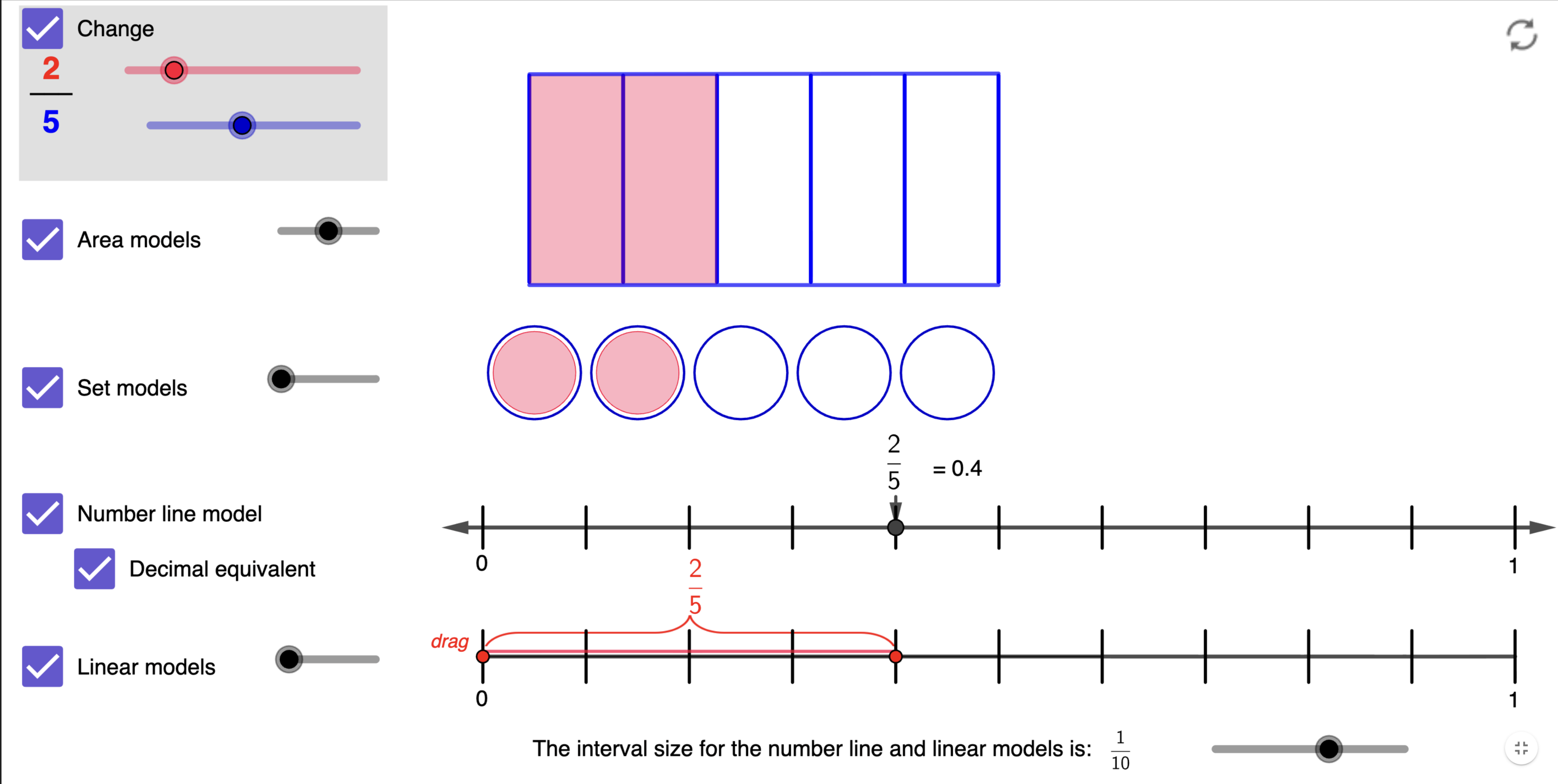
Three applets covering proper fractions using multiple visual models simultaneously, area, set, and linear representations, including a version that displays two fractions side by side. A third applet focuses specifically on equivalent proper fractions, allowing pupils to see how the same quantity can be expressed different ways.
2. Improper Fractions
Area models for improper fractions, again with a two-fraction comparison version, plus a Fractions Set Model applet that represents fractions using collections of discrete objects, a less common but important representation for pupils who have only ever seen fraction bars or circles.
3. Fractions on a Number Line
Five applets in this chapter, covering fractions between 0 and 1, fractions between 0 and 2, mixed numbers, and two locating exercises where pupils place fractions on a number line themselves. This chapter is particularly valuable, the number line is the representation most connected to how fractions behave in later mathematics, yet it is often the one pupils are least comfortable with.
4. Comparing Fractions
Two applets: one for comparing rational numbers expressed as fractions, and a Fraction Relationships with Visual Models applet that displays both quantities simultaneously to make the comparison concrete. Ideal for addressing the common misconception that a larger denominator always means a larger fraction.
5. Adding Fractions
A Fraction Strip Addition applet that uses fraction strips (similar to a fraction wall) to show addition dynamically. Pupils can adjust the fractions and watch the strips resize, building intuition for why common denominators are needed before the symbolic procedure is formalised.
6. Multiplying Fractions
The largest chapter, with four applets. Two introduce area model multiplication, first with unit fractions, then with any proper fractions, and a third provides area model problems for pupils to solve. The Field of Fractions applet offers a more playful context for exploring the same ideas.
7. Dividing Fractions
A single, focused applet using bar models to represent fraction division problems. This is the operation pupils most commonly learn as a rule ("flip and multiply") without any understanding of why, the bar model helps gives that meaning.
Using the collection in the classroom
Building the concept before the procedure
Each chapter works best when used before formalising a written method. Show the applet, let pupils describe what they see, ask what they expect to happen when a slider is moved, then move the slider and discuss. The visual should generate the question that the procedure later answers.
For example, before teaching the algorithm for adding fractions with different denominators, open the Fraction Strip Addition applet with \(\frac{1}{2}+\frac{1}{3}\). Ask pupils: "Can you see why we can't just add the 2 and the 3?" The strips, visibly different lengths, make the problem self-evident.
Multiple representations side by side
Several applets display more than one model simultaneously, area diagram, number line, and set model all showing the same fraction at once. Use these to make explicit that \(\frac{3}{4}\) means the same thing whether it appears as three shaded sections of a circle, a point three-quarters of the way along a line, or three objects out of four. Pupils who have only ever seen one representation are often genuinely surprised to find it's the same number.
The number line chapter deserves particular attention
Fractions on a number line is a topic many pupils find disorienting, but it is foundational. The Where is the Fraction? applets let pupils drag to place a fraction, then check. An ideal low-stakes activity for building this spatial sense. Use these regularly as starters, not just as a one-off lesson.
Addressing the "bigger denominator = bigger fraction" misconception
Open the Comparing Fractions applet and set up \(\frac{1}{2}\) vs \(\frac{1}{3}\). Ask the class to vote on which is bigger. Then adjust to \(\frac{1}{8}\) vs \(\frac{1}{4}\). Pupils who have just argued that the bigger denominator means bigger will now need to revise their thinking. The visual model does the arguing so you don't have to.
Dividing fractions: finally making sense of "flip and multiply"
The bar model for fraction division is one of the most important visuals in this collection. Display \(\frac{3}{4} \div \frac{1}{2}\) and ask pupils what they think the question is asking. Guide them to see: "How many halves fit into three-quarters?" Once pupils can answer that from the bar model, the procedure becomes a shortcut to something they already understand, rather than a mysterious rule.
Discussion questions across the collection
- "The denominator is bigger, but is this fraction bigger or smaller? How does the diagram help you see why?"
- "These two fractions look different. Can you tell from the picture whether they're equal?"
- "When we add these two fractions, why can't we just add the numerators and denominators separately? What does the strip show you?"
- "What does it actually mean to divide by a fraction? What question is the bar model asking?"
- "Can you find a fraction that lands on exactly the same point on the number line as this one?"